Tools & Calculators · · 2 min read
Polygon Partition Tool
Draw or import a polygon, split it into parts and get areas and perimeters, all in your browser. Built for surveyors, civil engineers and GIS practitioners.
Live readers, last 5 h 0Total visitors 4,864
How to Use?
🧩 Polygon Partition Tool
A specialized offline polygon partitioning tool built for land surveyors, civil engineers, and GIS practitioners.
It allows you to draw, import, partition, and calculate areas/perimeters of polygons directly in the browser.
Perfect for fieldwork and planning tasks where advanced GIS software is not accessible.
✨ Features
📂 Input & Setup
- Import polygon points via CSV (X, Y, Name).
- Or start with a Sample Polygon for quick demo.
- Editable Table → add, delete, or reorder points with drag‑and‑drop.
- Toggle point usage (include/exclude).
✂️ Partitioning
- Draw interactive cut lines to partition polygons.
- Auto‑fit cut → divide polygon into exact target area.
- Blue/Yellow Preview → instantly shows both sides of the partition with area + perimeter.
- Undo last partition with one click.
📐 Measurement & Units
- Area and perimeter auto‑calculated for each partition.
- Supports unit selection: meters (m), feet (ft), or custom factor.
- Real‑time labels on partitions showing Area + Perimeter.
📊 Outputs
- Download Partitions CSV → coordinates of each subdivided polygon.
- Download Summary CSV → partition names, areas, and perimeters (with totals).
- Export SVG Sketch → saves the visual polygon partition as SVG.
🎨 UI & Usability
- 🌗 Dark/Light Theme Toggle.
- 📜 Activity Log → keeps track of actions (CSV import, cuts, undo, etc.).
- ❌ Error alerts for invalid/self‑intersecting polygons.
- 🔍 Grid background with snap‑to‑edge option.
🖼️ Preview
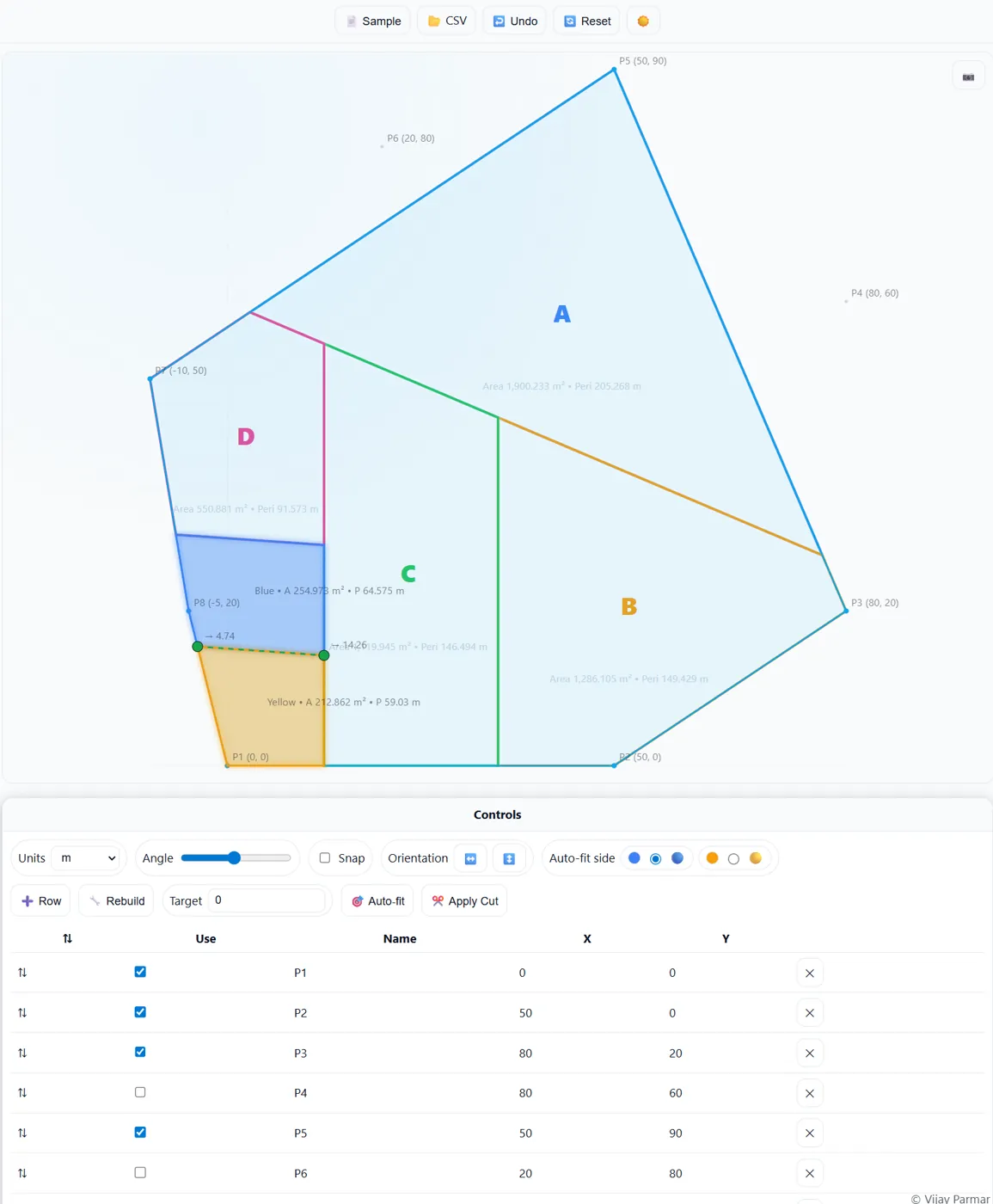
🚀 How to Use
- Open
Polygon-Partition-Tool.htmlin your browser. - Load points:
- 📂 Import CSV, or
- 📄 Use Sample polygon.
- Use handles + cut line to partition polygon.
- Auto‑fit to a target area or apply free cut.
- Save outputs as CSV or SVG for reporting.
📄 Example CSV Input
Name,X,Y P1,0,0 P2,50,0 P3,80,20 P4,80,60 P5,50,90 P6,20,80 P7,-10,50 P8,-5,20⚡ Why Use This Tool?
- 🧑💼 Built for field engineers & surveyors needing polygon splits quickly.
- 🌐 Works offline – no internet or GIS software needed.
- 📊 Generates ready CSV reports for documentation.
- 🎯 Accurate area/perimeter calculations with unit conversion.